Using ARI-OS day to day
ARI-OS gives you one chair to work from. You direct from your main session, and the heavy work runs in the background. This page is the reference for the surface you touch every day: the slash commands, the skills, the Cortex memory tools, dispatch, the monitor, and the control panel.
The shape is always the same. You stay in the conversation and set the direction. Workers run elsewhere and report back. AI accelerates, it does not generate. The judgement stays with you.
If this is your first visit, start with the overview for the why, and the install guide for the setup.
Slash commands
These run inside your main session. They are the verbs you reach for most.
- /brainstormcommandOpen a structured brainstorm that pulls intent and requirements out before any code is written.
- /dispatchcommandHand a brief to a background worker and keep working in your own session.
- /dreamcommandRun a memory consolidation pass, distilling raw capture into durable signal.
- /handoffcommandWrite a clean handoff document so the next session can pick up where you left off.
- /monitorcommandOpen the live monitor to watch every running worker in one place.
- /morningcommandRun the morning briefing: a maintenance check and a dashboard of what is in flight.
- /nightcommandClose the day out with an end-of-day review layered on top of a consolidation pass.
- /prefetchcommandWarm the Cortex ahead of a task so the right context is loaded before you ask.
- /recallcommandPull the most relevant past context for a query straight into the conversation.
- /remembercommandSave a fact, a decision, or a piece of thinking to the memory layer.
Skills
Skills are the named capabilities the orchestrator can step into. A command often invokes the matching skill, but the orchestrator can also reach for a skill on its own when the work calls for it.
- advisorskillAdvisor-driven development: the orchestrator plans, cheaper models execute, and complexity escalates back up.
- brainstormskillExplore intent, requirements, and design before any building begins.
- dreamskillConsolidate memory: orient, gather, distil, and prune.
- handoffskillProduce a structured handoff so context survives the end of a session.
- morningskillAssemble the morning briefing from maintenance state and active work.
- nightskillRun the end-of-day strategy review and consolidation.
- prefetchskillLoad the context a task will need before the task starts.
- recallskillRetrieve relevant memory across the brain for a query.
- rememberskillCommit text to the shared memory layer.
- teachskillCapture your methodology, patterns, and operating principles into memory drafts as you work.
The Cortex memory tools (MCP)
The memory brain is exposed to your model through an MCP server named ari-os-cortex. The install guide wires this up for you. To register it by hand:
claude mcp add ari-os-cortex -- python -m ari_os.tools.cortex.mcp_server stdio
Once it is registered, your model can call these tools directly. The names are stable and the parameters are listed in full.
- brain.recall(query, mode='default', k=12, token_budget=4000, session_id)toolRecall the most relevant past context for a query.
- brain.remember(text, layer='semantic', source)toolStore a memory. It dedupes by the sha256 of the text.
- brain.lineage(chunk_id)toolTrace where a memory came from.
- brain.regions()toolList the memory regions.
- brain.tracts(n=100)toolList the strongest connections.
- brain.entities(kind, k=50)toolList known entities.
- brain.relations(entity, k=50)toolList an entity's relations.
- brain.modes()toolList the retrieval modes.
- brain.see(image_path, mode='visual')toolDescribe an image. Off until LENS plus a local vision model are enabled.
- brain.lens(slug)toolApply an aesthetic lens. Off until LENS is enabled.
brain.see and brain.lens are off by default. They switch on once LENS, and a local vision model for brain.see, are enabled. For the deeper memory workflow, how recall, consolidation, and regions fit together, read the brain page.
Dispatch background workers
Dispatch is how one prompt becomes several workers running in the background. You write the brief, hand it off, and stay in your own session while the work happens elsewhere.
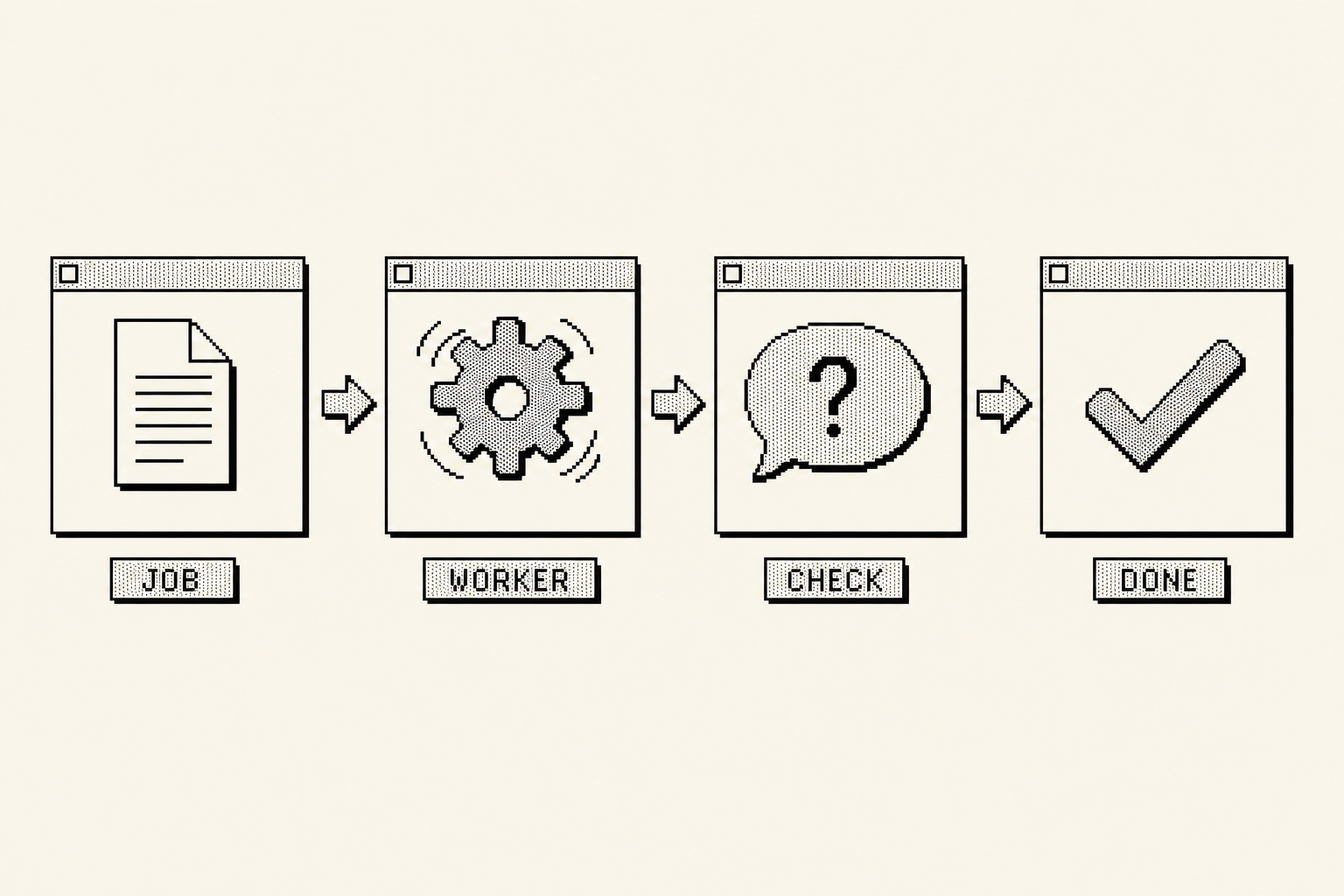
To start a worker:
python3 -m ari_os.tools.dispatch start --executor sonnet --task-file BRIEF.md --cwd ./worktree --label mytask
A few rules keep dispatch safe and predictable.
The executors are haiku, sonnet, and opus. Pick the smallest one that can do the job, and escalate only when the work demands it.
Two extra flags shape what a worker can touch: --add-dir grants access to an additional directory, and --read-only runs the worker without write access.
Dispatch refuses a git repository root as --cwd. Point it at a worktree or a subdirectory instead, so a worker can never act on the whole repository at once.
Once workers are running, manage them from your session:
python3 -m ari_os.tools.dispatch list
python3 -m ari_os.tools.dispatch questions
python3 -m ari_os.tools.dispatch answer <worker_id> --answer "..."
dispatch list shows what is in flight, dispatch questions surfaces anything a worker is blocked on, and dispatch answer sends your reply back to a specific worker so it can carry on.
Watch it run
The monitor gives you one window onto every running worker, live.
python3 -m ari_os.tools.monitor
It opens at http://localhost:7777. Leave it running while you work, and you can see progress, questions, and completions without switching context.
Control panel
The control panel is the single command for configuring ARI-OS.
python3 -m ari_os.tools.arios
It takes these subcommands:
keysmanages the API keys for any models you use.theme <name>switches the visual theme.toggle <feature> on|offturns a feature on or off.updatepulls the latest version.cortex <setting> [value]configures the memory brain, wheresettingis one ofstatus,embeddings <auto|google|ollama|off>,mode <name>,wander on|off,ears on|off, orlens on|off.
For example, to check the state of the brain:
python3 -m ari_os.tools.arios cortex status
And to switch the retrieval mode to focus:
python3 -m ari_os.tools.arios cortex mode focus
Each cortex setting changes what the brain pulls and how. The brain page covers the modes and embeddings in depth.
You direct from the chair. The workers run in the shadows.
That is the whole daily surface. When you want to understand what the memory layer is doing underneath all of this, the brain page is the next stop.